Dashboard
The Integrations Dashboard provides a comprehensive overview of your workflow performance, execution metrics, and system health. Monitor everything at a glance.
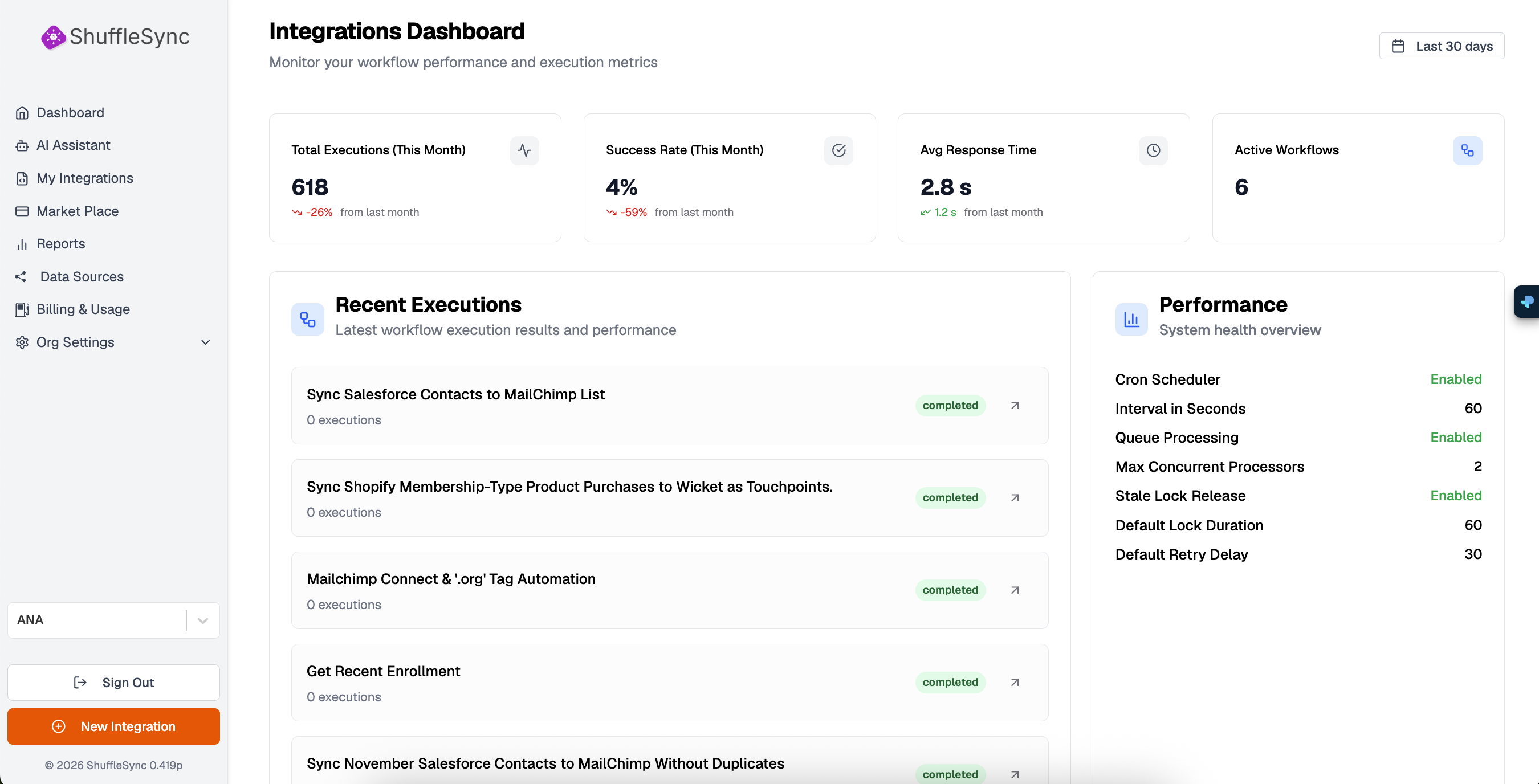
Overview Metrics
The top section of the dashboard displays four key performance indicators (KPIs) that give you instant insight into your integration health:
Total Executions
Shows the total number of workflow executions for the selected time period (default: last 30 days). The percentage indicator shows the change compared to the previous period.
Success Rate
Displays the percentage of successful workflow executions. A healthy integration should maintain a success rate above 95%. If your success rate drops, check the logs for specific error messages.
Average Response Time
Shows the average time it takes for your integrations to complete execution. This metric helps identify performance bottlenecks. The comparison shows change from the previous period.
Active Workflows
Displays the number of integrations currently active and running. This count includes both scheduled (CRON) and API-triggered workflows.
Time Period Selection
Recent Executions
The Recent Executions panel shows your latest workflow runs with their current status. Each entry displays:
- Integration Name: The workflow that was executed
- Execution Count: Number of times this workflow has run
- Status: Current status (completed, running, failed)
- Quick Actions: Click the arrow icon to view detailed logs
Performance Panel
The Performance panel provides system health information for your ShuffleSync environment:
| Metric | Description |
|---|---|
| Cron Scheduler | Status of the scheduled task runner (Enabled/Disabled) |
| Interval in Seconds | How frequently the scheduler checks for pending tasks |
| Queue Processing | Status of the workflow execution queue |
| Max Concurrent Processors | Number of workflows that can run simultaneously |
| Stale Lock Release | Automatic release of stuck workflow locks |
| Default Lock Duration | How long a workflow can hold a processing lock |
| Default Retry Delay | Wait time before retrying a failed workflow |
Pro Tip
Sidebar Navigation
From the dashboard, you can quickly access all ShuffleSync features using the left sidebar:
- Dashboard: Return to this overview at any time
- AI Assistant: Get help building integrations with AI
- My Integrations: Manage your custom workflows
- Market Place: Browse pre-built templates
- Reports: Generate data reports from your integrations
- Data Sources: Connect and manage your platforms
- Billing & Usage: Monitor your subscription and usage
- Org Settings: Configure teams, API keys, and more